Guru Group LLC - Cloud Consulting & IT Solutions Provider | Microsoft & Salesforce Partner
  • Expertise
    • Microsoft Dynamics 365
      • Finance and Operations
      • Customer Relationship Management
      • Customer Engagement
      • Business Central
      • Dynamics 365 Security Services
    • Microsoft Fabric
      • How to build data cortex
    • Cloud Solutions
      • Microsoft Azure
      • DevOps
    • Microsoft Power Platform
    • Security Services
      • Application Security
      • Cloud Security
      • Network Security
      • Red Team Assessment
    • Revenue Cycle Management
    • Salesforce
    • SAP
    • Application Development
  • Products
      Guru Group LLC - Cloud Consulting & IT Solutions Provider | Microsoft & Salesforce Partner
    • Microsoft D365FO Connector for ADP Workforce Now
    • Guru Group LLC - Cloud Consulting & IT Solutions Provider | Microsoft & Salesforce Partner
    • BarTender Connector for D365
    • Guru Group LLC - Cloud Consulting & IT Solutions Provider | Microsoft & Salesforce Partner
    • ShipGuru
    • Guru Group LLC - Cloud Consulting & IT Solutions Provider | Microsoft & Salesforce Partner
    • BBPTechnologies
    • Guru Group LLC - Cloud Consulting & IT Solutions Provider | Microsoft & Salesforce Partner
    • LIS365
    • Guru Group LLC - Cloud Consulting & IT Solutions Provider | Microsoft & Salesforce Partner
    • HSBC Connector for Microsoft D365FO
    • Guru Group LLC - Cloud Consulting & IT Solutions Provider | Microsoft & Salesforce Partner
    • Paycrypt365 Connector for Microsoft D365FO
  • Industries
      Guru Group LLC - Cloud Consulting & IT Solutions Provider | Microsoft & Salesforce Partner
    • Healthcare
    • Guru Group LLC - Cloud Consulting & IT Solutions Provider | Microsoft & Salesforce Partner
    • Government
    • Guru Group LLC - Cloud Consulting & IT Solutions Provider | Microsoft & Salesforce Partner
    • Insurance
    • Guru Group LLC - Cloud Consulting & IT Solutions Provider | Microsoft & Salesforce Partner
    • Banking & Financial Services
    • Guru Group LLC - Cloud Consulting & IT Solutions Provider | Microsoft & Salesforce Partner
    • Manufacturing
    • Guru Group LLC - Cloud Consulting & IT Solutions Provider | Microsoft & Salesforce Partner
    • Retail & E-Commerce
  • Company
    • About Us
    • Case Studies
    • Blogs
    • Careers
  • Contact Us
  • Staffing Solutions

Running an ER Report in Draft and Complete Status

Aamir Khan

15July

There are different statuses of Electronic reports.

Draft:

In this status, users can modify configurations. Unless manually specified by parameters, draft versions are not considered for generating reports. Microsoft’s default configuration hides draft versions.

Completed:

In this mode, the configuration can’t be edited anymore and is ready to be used. The most recently completed version of a configuration is used by dynamics.

Shared:

This mode can only be activated on completed reports. The configuration has been uploaded into the LCS repository configured in the configuration provider.

Discontinued:

Only a shared configuration can be discontinued. This allows the configuration to be deleted and D365FO will no longer use this configuration when running reports.

Running Report In Draft Status:

For testing purposes, instead of marking the status ‘Complete’ every time we need to check the new feature. Simply set file generation in a draft state. So, testing can be done easily.

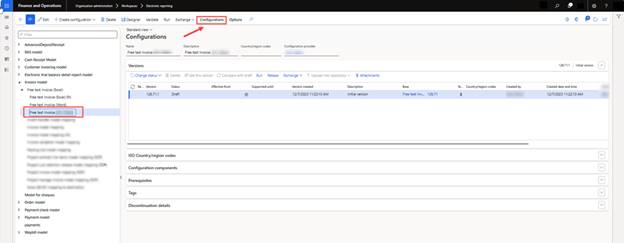
Select your report format and click on the ‘Configuration’ button and open the ‘User parameter’.
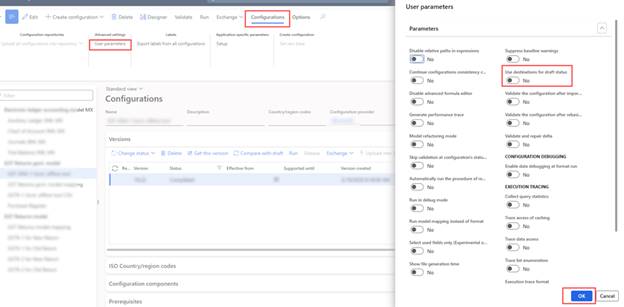
Now, enable the ‘Use destinations for draft status’ radio button generating files in a specific format (Excel/PDF/XML) in the draft state.
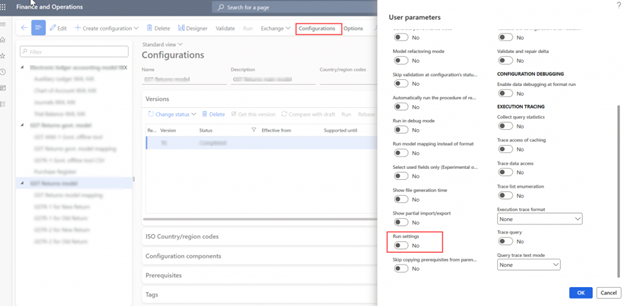
and enable the ‘Run setting‘ to run in draft status.
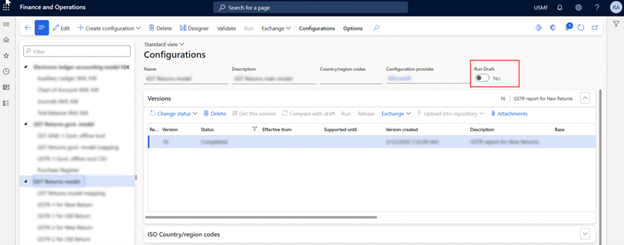
Now a radio button named ‘Run Draft’ appears on the configuration tab. Enable it as well.
Now, run the report by clicking the ‘Run’ button from the action pane.

Running Report In Complete Status:

After completing the design, we need to change the status of our customized report format from draft to ‘Complete’.
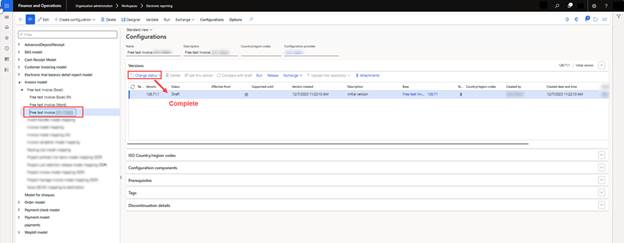
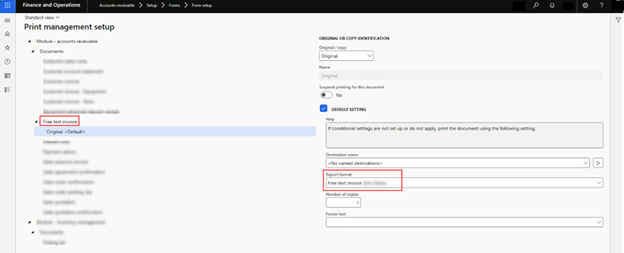
Now set this ER report from Print Management as the default report.

Path: (Accounts receivable> Setup> Forms> Form setup> General> Print management>Free text invoice> Report format)
And set the destination file as PDF. To check how to set the destination file please read the article.

Now create a new record and run the report from its actual path. In this case: ‘Free text invoice report’

Path: Accounts receivable > Free text invoices > All free text invoices.

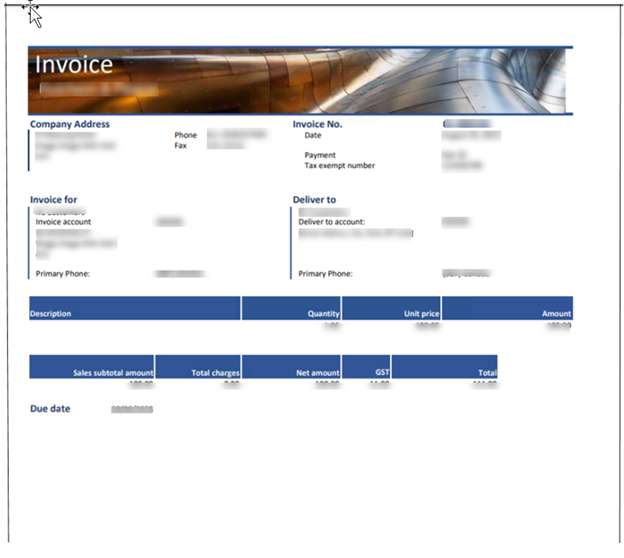
Output:
Tags:
D365 Dynamics 365 Destination ER JSON XML Report Word PDF file
Guru Group LLC - Cloud Consulting & IT Solutions Provider | Microsoft & Salesforce Partner

GuruGroup recognizes the importance of staying up to date through frequent self-inventions. We achieve this by continually attracting the brightest minds in modern digital paradigms and platforms.

  • About Us
  • Products
  • Industries
  • Blogs
  • Contact Us
  • Careers
  • Support
Guru Group LLC - Cloud Consulting & IT Solutions Provider | Microsoft & Salesforce Partner

104 S Woodburn Dr,
Dothan, AL 36305

Guru Group LLC - Cloud Consulting & IT Solutions Provider | Microsoft & Salesforce Partner

Phone: +1 334 446-5235

Guru Group LLC - Cloud Consulting & IT Solutions Provider | Microsoft & Salesforce Partner

Email: info@gurug.com

  • Guru Group LLC - Cloud Consulting & IT Solutions Provider | Microsoft & Salesforce Partner
  • Guru Group LLC - Cloud Consulting & IT Solutions Provider | Microsoft & Salesforce Partner
  • Guru Group LLC - Cloud Consulting & IT Solutions Provider | Microsoft & Salesforce Partner Guru Group LLC - Cloud Consulting & IT Solutions Provider | Microsoft & Salesforce Partner Guru Group LLC - Cloud Consulting & IT Solutions Provider | Microsoft & Salesforce Partner
| GuruGroup
  • Terms & Conditions
  • Privacy Policy
  • AI Usage Policy
Ask Guru Group
Hi! 👋 How may I help you today?